Concorde

Concorde

Fly Concorde, Fly.

What’s new

  • ConcordeVPN 1.5.2 beta 1 now available — An explainer for each connection mode; Fix for iOS profiles with hostname servers; Fewer stuck states and safer password prompts
  • ConcordeVPN 1.5 now available — Bonding of two connections at once; Auto picks the fastest server; Metered connections kept in reserve
  • ConcordeAI 6.1 now available — Chats saved as you go, no limit; Backdrops that change scene hourly; App answers only its own window

Products

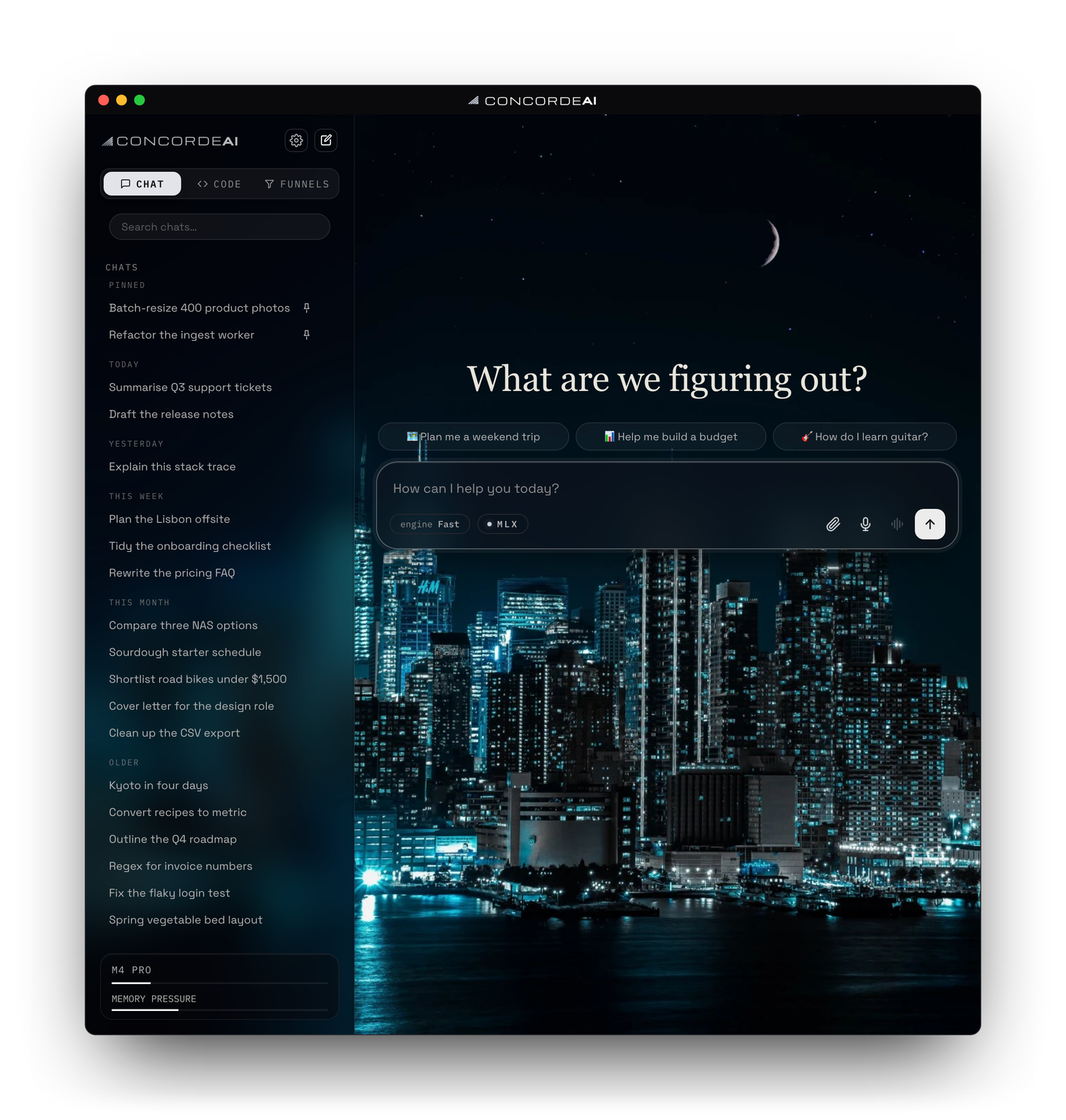
The ConcordeAI window on a new chat: a greeting, three suggested prompts and the message box, with recent chats in the sidebar. Enlarge

DownloadsmacOS and Windows.
Installed copies update themselves.

ConcordeAI

An AI desktop app that puts cloud models and local models in one place.

macOS Windows
  • 01
    Cloud + localAdvanced cloud models and local models in one workflow.
  • 02
    Image generationAsk for a picture and get one, made on your Mac or by a cloud model.
  • 03
    FunnelStaged decision flows: pick through option cards, end with a recommendation.
  • 04
    Code featuresA code lane with a remote SSH agent and per-command approval.
Stable 6.1 Released
Release notes
  • Windows — chats, searches the web, speaks and listens on Intel, AMD and ARM PCs; installs Ollama for you
  • Video — ask for a short clip and it renders on your Mac; a size ladder shows what each quality costs
  • Export — ask for an answer as a PDF, Word document, spreadsheet, slides, calendar file, CSV and more
  • Removed — Contribute and the free community image cloud
  • Plus smaller fixes and polish — full notes on GitHub
Nightly 7.0 build 76baa35 Built
Release notes
  • Benchmark on this computer — a stalled model load is stopped and the reason shown, you can skip a model, and a busy machine is flagged
  • Benchmark Stop — stops right away instead of waiting for memory to settle
  • Sidebar — Pinned and Recents can be folded up from their headings
  • Waking from sleep — lights come back white and fans return to 20%, as on a fresh idle
  • Plus smaller fixes and polish — full notes on GitHub
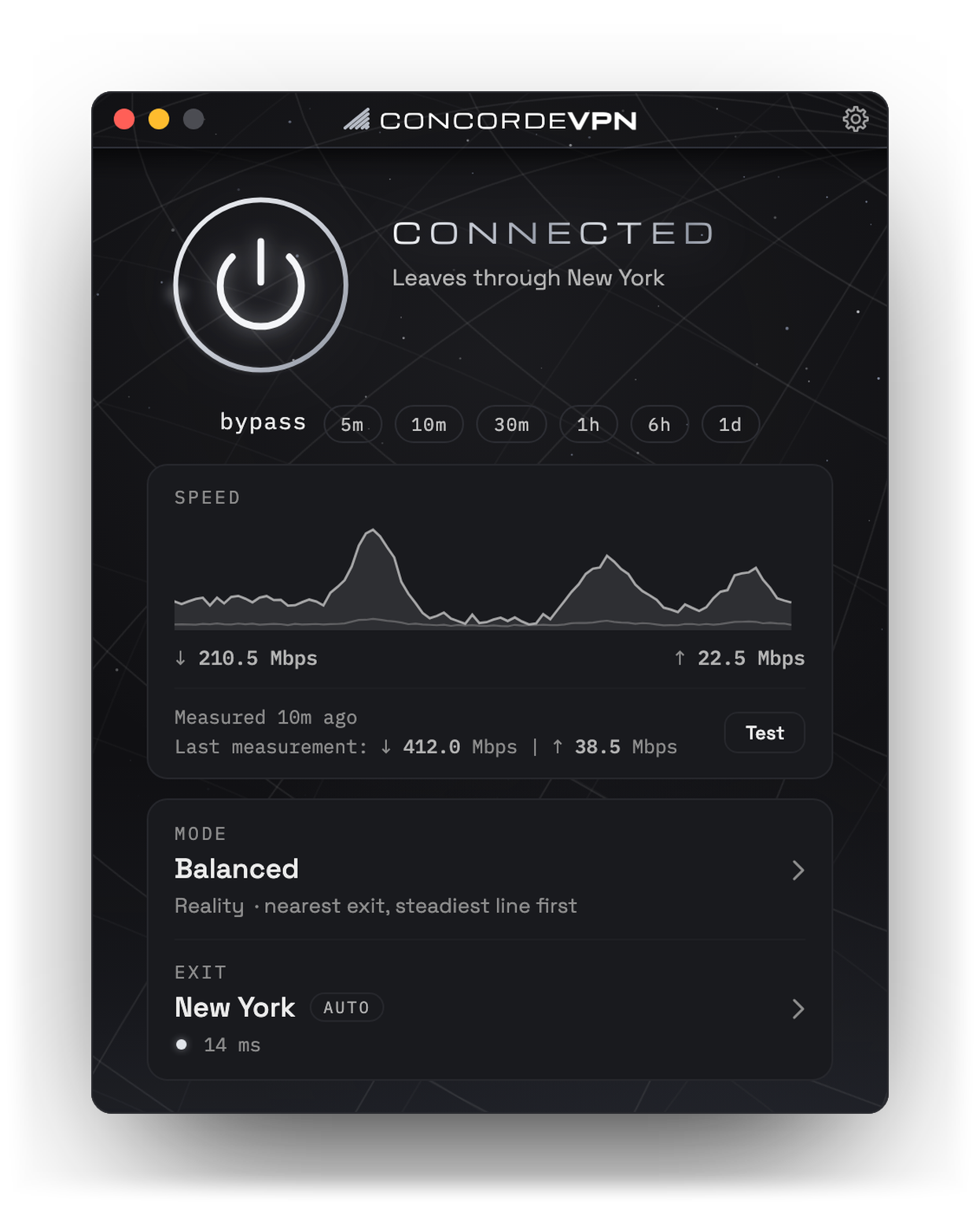
The ConcordeVPN window: connected, leaving through New York, with its speed graph and last measurement, the mode set to Balanced and the exit on Auto. Enlarge

DownloadsmacOS.
Bring your own server — three ways to set one up, below.

ConcordeVPN

A menu-bar VPN client for your own exit node. Bring your own server — the one-command installer is included.

macOS
  • 01
    Three transportsTrojan, VLESS + REALITY and Hysteria 2, tried in order as a network gets more hostile — or raced on latency.
  • 02
    Unmodified mihomoThe app is a thin, fast control plane over a stock engine.
  • 03
    One click, no sudoMenu bar or global hotkey. No password after install.
  • 04
    DNS filteringOptional NextDNS blocking, with the lists you choose. Without it, DNS is still encrypted.
  • 05
    Leak test & benchBuilt-in leak test and throughput bench.
  • 06
    Self-updatingChecks for new builds and updates itself in place.
Stable 1.5 Released
Release notes
  • Bonding — use two connections at once, like Wi-Fi and Ethernet or a phone by USB, for networks that cap each device
  • Metered connections — phones and data-plan connections are counted and join only when your main line is nearly full
  • Servers — Auto picks the fastest; change passwords, name or address in the app; QR codes for phone VPN apps
  • A cleaner main window — Mode and Exit open in place, your ISP under your IP, Quick or Extended speed test in every mode
  • Plus smaller fixes and polish — full notes on GitHub
Prerelease 1.5.2 beta 1 Released
Release notes
  • Mode explainer — what each mode does and gives up, plain summary first, then trade-offs and technical detail
  • Low speed results — the note now says it's this Mac, names a weak Wi-Fi signal, and can be hidden
  • iOS profiles — profiles for a server set up with a hostname are no longer refused
  • Fewer stuck states, safer password prompts and a steadier Speed card
  • Plus smaller fixes and polish — full notes on GitHub
Nightly 1.5.2 build f562800 Built
Release notes
  • Location menu — scrolling the list with the wheel or scrollbar no longer closes the menu
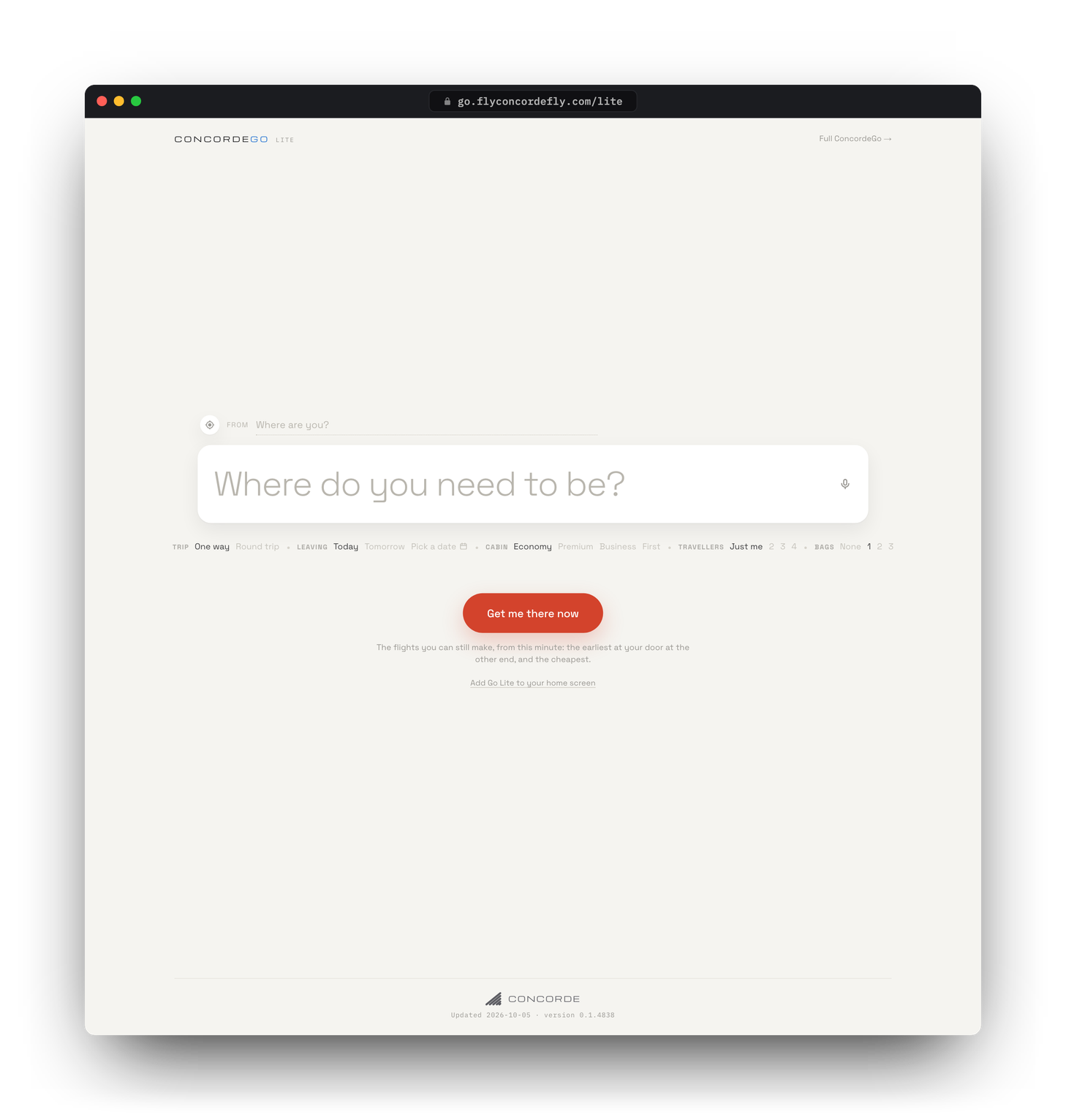
ConcordeGo Lite in a browser, as it opens: one box asking Where do you need to be?, today, one way and economy already chosen, and a single Get me there now button. Enlarge

In your browserNo download, no install.
Free: it shares ConcordeGo’s 5 searches a day, or 30 with an account.

ConcordeGo Lite

Beta

For when you need a flight now. One question, and the best flights you can still make.

Any browser Desktop + phone
  • 01
    One question“Where do you need to be?” It assumes today, one way, economy and one bag. One tap changes any of them.
  • 02
    Earliest or cheapestThree of each, side by side, from the flights you can still get to.
  • 03
    Door to doorWhen to leave the house, when you reach the door at the other end, and the all-in price.
  • 04
    Anything else?Type or say it: “nothing before 9”, “not through Dallas”, a seat, an airline.
Coming soon

ConcordeGo

Coming soon

The full ConcordeGo is coming soon. ConcordeGo Lite, above, is available now.

Install

Which build

ConcordeAI and ConcordeVPN each come in up to three builds, one tab each on the download card:

  • StableThe finished release. Start here if you just want it to work.
  • PrereleaseBetas and release candidates: new features before Stable, tested but not final.
  • NightlyBuilt from the work in progress, often more than once a day. Newest of everything, and the most likely to break.

The choice is not permanent. Each app has an Update channel setting in Settings, and updates follow whichever channel you pick.

Gatekeeper

macOS builds are not notarized. The first launch will be blocked. Open System Settings › Privacy & Security, scroll to the message naming the app, and click Open Anyway. Once per version.

ConcordeVPN servers

Bring your own server — there is no network to sign up for. Three ways to get one:

  1. Automated setupPaste a DigitalOcean token, pick a region and size. The app does the rest.
  2. Command line setupOn a fresh Ubuntu 22.04 or 24.04 server, as root: curl -fsSL https://flyconcordefly.com/concordevpn-server.sh -o concordevpn-server.sh && bash concordevpn-server.sh install Paste the block it prints into the app. concordevpn show prints it again.
  3. Manual setupFor a server you already run: address, three passwords, certificate fingerprint. NextDNS profile ID is optional.

The tunnel is yours end to end. It is not an anonymity tool, and we make no claims about what your server, your host or your network records.

FAQ

ConcordeAI

Does ConcordeAI run locally?

Yes. Models download to your computer and run there: MLX on Apple silicon, Ollama on Intel Macs and Windows, using CUDA on NVIDIA cards. Cloud models stay off until you add an API key. Without one, two things still go online: web search, for questions about the world, and image requests, unless local image generation (Apple silicon only) is installed.

How much disk space do I need?

The setup wizard shows each model set's download size for your machine before anything downloads. Basic is one 0.8 GB model. On a Mac, Pro is 7 to 11 GB, and Max, the largest set, is 22 to 25 GB with 16 GB of memory or about 50 GB with 32 GB. Local image generation, Apple silicon only, adds 9.6 GB.

How much memory do I need?

ConcordeAI only lists models your machine can hold: by default, those within 75% of your RAM, or on a PC with an NVIDIA card, 1.25 times the card's memory if that is lower. Loading a model needs about one and a half times its size free, so roughly 4 GB for Llama 3.2 3B and 12 GB for Gemma 4 12B. If a model can't load, a smaller installed one answers.

Why use it over an online AI tool?

With no cloud key, text answers come from models on your computer, your chats are saved in a file on it, and local models work offline. Add a Gemini, Groq, Claude or Kimi key and cloud models join in. Thinking and Pro modes blend several models' drafts into one answer, and the same window has a Code lane, with an SSH agent that asks before irreversible commands, and Funnels for step-by-step decisions.

What is Funnel?

A way to make a decision rather than chat about one. Open Funnels and say what you’re deciding, plus anything that has to hold, such as a budget or a size. ConcordeAI then asks one question at a time, each with a few options to pick from, and every pick narrows the next question, so the choices close in instead of starting over. It ends with one recommendation: a real, named pick, why it fits what you chose, and what to do next. Some funnels show a real photo from the web with each option.

Can I use my chats on another computer?

It’s coming: an optional sign-in that carries your chats between your own computers. Until then, your chats are saved in a file on the computer you use, and ConcordeAI keeps working without an account.

ConcordeVPN

Is a Windows version coming?

Not at the moment. ConcordeVPN is macOS only and no Windows version has been announced: it is built from macOS parts, from the background service that runs the tunnel to the menu-bar app itself.

What does it do that other VPN software doesn't?

It has three ways through, Trojan, VLESS + REALITY and Hysteria 2, and when one stops answering it moves to the next. REALITY answers a probe with the real website whose certificate it borrows. The app names your exit only after checking your public address, has a built-in leak test, and has a kill switch that stops internet traffic leaving outside the tunnel (from 1.4).

Why do I need to run my own server?

ConcordeVPN is only the client: there is no ConcordeVPN network or account to sign up for. The tunnel ends at a server you run, where the installer generates the passwords and keeps the system log in memory only. The app can also create one on DigitalOcean for you. It is not an anonymity tool: the server sits in your own hosting account.

How does Auto optimize work?

A slider sets how the app trades privacy for speed, in five modes: Ultra Stealth, Stealth, Balanced, Performance and Ultra Performance. Auto optimize picks the mode for you. It runs the Quick speed test on the network you’re on, which takes about three minutes, then takes the fastest mode, unless a more private one comes within 5% of it. It tests again whenever you join a new network, and every two hours on the same one; Settings › Network › Retest every changes the interval. The two Ultra modes are left out unless you tick Include Ultra modes. Available from 1.4.

What are the Ultra modes for?

They are the two ends of the slider, with no compromise: Ultra Stealth for the most stealth and privacy, Ultra Performance for the most speed. Ultra Stealth is for networks that inspect traffic or block VPNs: it uses one disguised line, VLESS + REALITY, with no fallback, and keeps even your bank, region and captcha exceptions inside the tunnel. Ultra Performance holds on to the quickest line even when it wobbles, pushes its speed limit a little past Performance’s and keeps adjusting it as you go, and sends big game and system-update downloads, such as Steam or Windows Update, outside the tunnel from your real address. Those extra tweaks are what can cause glitches, such as some sites not loading or speed that comes and goes; the other three modes are less likely to have quirks. To see which is best on your network, run the Speed test in Settings › Network. Available from 1.4.

ConcordeGoBetago.flyconcordefly.com ↗

Why use it over other flight search tools?

Every flight site sells the same flights. ConcordeGo ranks them by what the trip costs door to door, in dollars: the ticket, bags the fare leaves out, rides to and from the airports, layovers, your time and comfort. Each flight gets a letter grade on six rubrics, with price judged against a fair fare for that route and date. Same search, same data, same order.

What's the Flight Fixer?

It is for a flight that is delayed or canceled. It searches the day's other flights and prices each one: the ticket, less any refund you may get, less the time it saves at your hourly rate, plus an estimated hotel night and rides if it leaves tomorrow. It says switch, stay or wait, estimates your odds of flying out today, and lists what you may ask the airline for.

How is the all-in cost worked out?

All in is what you pay: the ticket with taxes and fees, checked bags the fare doesn't include, rides to and from the airports, a hotel night when a layover runs overnight, and extras you ask for, such as a wifi pass. Rides are estimated from your address and the time of day, and lean high; an unpublished bag fee is priced high, never free. Your time and comfort change the order, not the bill.

Is it free? Do I need an account?

It’s free, in any browser, with nothing to download. Signed out, you get 5 searches a day; a free account raises that to 30. The limits will go up as we adjust for demand.

How do points and miles work?

Add your balances, and each flight also shows what it costs in points, priced from the airlines’ published award charts, with a plan for which card’s points to transfer and how many. A chart price is what a seat costs if the airline releases one: ConcordeGo can’t see award availability, and says so. Programs that publish no chart, such as Delta, United and Flying Blue, are shown as able to book the flight, never with a guessed price.

Contact

Feedback

Found a bug, have an idea, or just want to say hi? I’d love to hear from you! 👋

This is a spare-time hobby for me, so I may not be able to reply to every message. Not every idea will make it in either, but they all help.

About

Why they exist

I built these to fill gaps: things the apps I already used couldn’t do, and tools I needed that didn’t exist. Once they worked well enough for me every day, I cleaned them up so other people could use them too.

This is a hobby, not a business, and I’m adding features all the time. If one of these turns out to be useful to you, keep it up to date. ConcordeAI and ConcordeVPN update themselves; ConcordeGo is a website, so it is always current.

— Pat

Channels

ConcordeAI and ConcordeVPN each ship on up to three channels.

  • StableThe finished release. Use this one if you just want it to work.
  • PrereleaseBetas with new features and fixes I’ve confirmed. Relatively stable.
  • NightlyWhat I’m working on right now: new features, bug fixes, speed. It’s what I run myself, and it may have bugs the others don’t.